
How Much Strain Do Working From Home and Online Conferences Put on Our Ears?
For many employees, the COVID-19 pandemic has turned their daily face-to-face conversations with coworkers upside down. How can communication still be effective? Can employees working from home hear clearly? A survey sheds light on the issue.
At a Glance
- One in two people experiences communication problems while working from home
- These background noises prevent us from hearing clearly while working from home
- Tips for successful video conferences
“Can you hear me?”, “Can you hear me clearly?”, “Sorry, there’s a lot of background noise here right now.” Many Germans are familiar with these phrases from their new daily routine. The COVID-19 pandemic has drastically changed the way we communicate with one another: Lockdowns, working from home, and homeschooling mean far less in-person contact and, instead, online conferences and phone calls.
And in our personal lives, too, we’re reliant on digital communication due to the need for social distancing. A representative Civey survey shows just how much our hearing is strained when working from home without the additional nonverbal cues provided by gestures and facial expressions: For about 50 percent of Germans, communication with their coworkers has deteriorated as a result of working from home. They have difficulty hearing and understanding their coworkers.
Distracting Noise Sources in the Home Office
So much for peace and quiet at home. According to the results of a recent survey, the office often offers a much less disruptive and quieter work environment than one’s own home. Nearly 57 percent of respondents complain about higher noise levels while working from home. Roommates or partners, construction sites and traffic noise, children playing, and neighbors—who are usually working from home as well—are the biggest sources of noise and the biggest obstacles to hearing. The result: many employees have trouble hearing and struggle to concentrate.
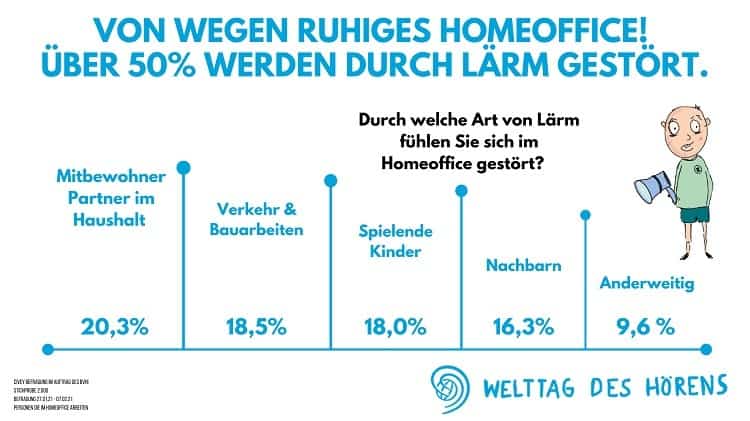
According to recent surveys, just over 60 percent of companies offer their employees the option to work from home (Statista 2021). This is a necessary and sensible precaution in light of the current pandemic situation, helping to prevent the further spread of the disease. It is expected that in the future, significantly more employees than before will work from home on a permanent basis—at least on a daily basis. However, this poses a major challenge for many people’s hearing. Hearing clearly while working from home is a problem for one in four employees. Many respondents find it harder to follow conversations and video calls at home than they do in the office.
Hearing clearly while working from home is becoming even more important
Hearing loss can also be a cause of hearing problems and increased susceptibility to background noise. During the pandemic, the importance of good hearing for a stress-free workday has increased significantly. Without the gestures, facial expressions, and overall nonverbal communication—which are so important, especially for conveying emotions—many employees must rely entirely on their hearing. After all, a successful conversation during video conferences and phone calls depends solely on having good hearing. Those with hearing difficulties often have to ask for repeats, clarify details, or resort to laborious communication via email or other time-consuming written formats.
Tips for Successful Video Conferences While Working from Home
- Familiarize yourself with the technology. Download the necessary tools and test features such as chat, screen sharing, and similar functions.
- Thoroughly prepare the content: Clarify the duration, agenda, and details, the number of participants, and who will moderate.
- Make sure you look presentable, and that your surroundings are tidy as well. Avoid wearing clothing that’s too flashy or large pieces of jewelry.
- Test your camera frame and ensure you have good lighting.
- Log in on time and introduce yourself briefly, just as you would in a face-to-face conversation.
- Speak clearly so that others can hear you well. Don’t position your microphone too close to your mouth, as the other participants might otherwise hear every breath you take.
- Make sure you can hear the other participants clearly. Headphones or streaming the audio directly to hearing aids can help with this.
- Politeness and professional conversation etiquette: Let others finish speaking, avoid background noise, and mute yourself when you’re not being spoken to. Stay focused within the camera frame and avoid any distractions. This is distracting and comes across as unprofessional.
- Especially if you’re joining the call on the go using your smartphone, make sure you have a stable network connection without dead zones.
- Summarize the results in a shared document and define the next steps. This ensures the meeting’s long-term success.
Hearing Loss Impairs Work Performance
If hearing loss goes undiagnosed and untreated, it has negative effects on work performance, one’s career, and all other areas of life: Those affected become increasingly socially isolated. This creates a vicious cycle, as the brain receives far fewer auditory signals to process. Furthermore, the effort required to compensate for the hearing loss leads to a decline in cognitive performance.
Intensive research is currently being conducted into the potential effects of untreated hearing loss on the brain.
A hearing test with an ENT specialist or hearing aid specialist will quickly and easily give you clarity on the state of your hearing and whether you can hear well while working from home. The earlier hearing loss is diagnosed and treated, the better it is for your career, your personal life, and your health.
What many people don't know: Modern hearing aids are so technologically advanced that they function as smart everyday assistants in the office and cool gadgets. Read on to learn how hearing aids, via a Bluetooth connection to a smartphone, PC, or tablet, make it possible to participate directly in virtual meetings without straining to hear or being distracted by background noise.